
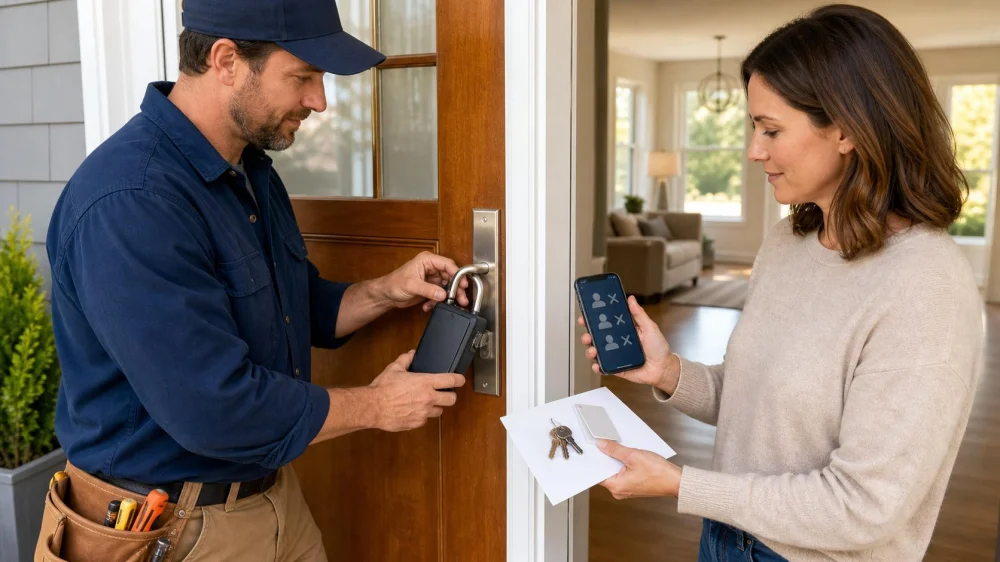
Contractor Lockbox Closeout: Remove Codes and Confirm Access
On this page
Quick answer
At the end of a project, list every temporary key, lockbox, keypad code, smart-lock user, garage remote, gate credential, alarm code, card, fob, and app invitation. Confirm the final authorized entry time, collect physical credentials, remove temporary lockboxes with permission, delete digital access, and review access logs where available.
Then test every affected door, gate, alarm, garage opener, and emergency egress function with the owner present. Rekey or change credentials when copies cannot be accounted for, the code was broadly shared, or the risk assessment requires it. Document closeout by credential ID and person—not by publishing active codes or key details.
Inventory every temporary access method
Start with contracts, emails, texts, property-manager notes, and the original access plan. Build one list covering:
- mechanical keys and keyed padlocks;
- portable or mounted lockboxes;
- door, gate, elevator, and alarm keypad codes;
- smart-lock users, temporary PINs, app invitations, and administrator accounts;
- access cards, fobs, badges, and parking credentials;
- garage and gate remotes;
- vendor portals, intercom directories, and delivery access;
- keys hidden onsite or held by neighbors, cleaners, inspectors, and subcontractors.
Include credentials created informally during the job. One supervisor's key may have been copied or passed to a subcontractor without reaching the main log.
Confirm the last authorized entry
Set a clear cutoff date and time after the final inspection, punch-list work, deliveries, cleanup, and permit visits. Notify every contractor and property contact in writing.
Do not delete access too early when authorized workers still need to correct work, but do not leave it active indefinitely “just in case.” Create a new one-time appointment and limited credential if follow-up becomes necessary.
Ask who is still onsite before changing codes or alarms. Sudden lockout can create safety, tool, material, vehicle, or legal problems.
Collect keys, fobs, cards, and remotes
Use a signed return table with credential ID, issue date, assigned person or company, return date, condition, and receiver. Count each item rather than accepting a bag without inventory.
Ask the contractor to certify whether copies were made and whether any credential was lost, loaned, damaged, or never returned by a subcontractor. A returned original does not prove no copy exists.
Disable electronic cards and fobs even when returned. A credential might have been cloned, replaced, or associated with an account that remains active.
Remove lockboxes without damaging property
Identify the owner and mounting method before removal. A lockbox may belong to the contractor, real-estate professional, property manager, utility, or owner. Obtain permission and record who takes possession.
Use the intended combination or authorized removal method. Do not cut, pry, drill, or strike a box without verified authority and a plan to protect the door, railing, pipe, gate, and finish.
Inspect the mounting area for scratches, bent hardware, trapped moisture, finish damage, or a loose railing. Photograph the condition and complete any agreed repair.
Delete codes and digital accounts
Change shared keypad and alarm codes, then remove individual users from smart locks, access-control portals, intercom systems, cameras, garage apps, hubs, and automation routines. Review administrators, recovery emails, phone numbers, API integrations, voice assistants, and shared-home memberships.
Do not merely disable notifications. Confirm the credential can no longer unlock or disarm. Preserve access logs only according to privacy, contract, and retention requirements.
Transfer the primary administrator to the property owner using the manufacturer's process. Resetting a device without planning can erase legitimate users, schedules, integrations, or audit history.
Test the property after closeout
With each door open first, confirm the owner's retained key works smoothly and each former project key no longer works where access was changed. Then close the door and verify latch, deadbolt, strike alignment, closer, weather seal, and authorized egress.
Test gates, garage doors, alarms, intercoms, cards, fobs, smart locks, battery backups, physical overrides, and owner notifications. Confirm emergency contacts and monitoring records now point to the correct people.
Record unresolved items: missing credential, damaged hardware, offline smart lock, code that cannot be removed, untransferred account, door that binds, or follow-up vendor access. Assign an owner and deadline.
Frequently asked questions
Should I rekey after every contractor project?
It depends on how access was controlled, whether keys were copy-restricted, whether all copies are accounted for, property risk, and owner policy. Ask a verified locksmith.
Is deleting a smart-lock PIN enough?
Not always. Remove app users, administrators, shared-home access, integrations, and recovery methods, then test the old credential.
Can a contractor keep a key for warranty visits?
Use a new time-limited appointment and credential when needed. Permanent retained access should require explicit written authorization.
Who removes the lockbox?
The owner or authorized holder should decide. Do not remove a box whose ownership or purpose is unclear.
What if one key is missing?
Document it immediately, identify the affected locks, and make a risk-based decision about rekeying or replacement with the owner and locksmith.
Limits and professional help
This checklist does not determine tenant rights, contractor rights, locksmith licensing, surveillance law, retention duties, fire code, or authority to remove property. Requirements vary by jurisdiction, contract, building, and system.
Use qualified professionals for master-key systems, access control, alarms, fire-rated doors, panic hardware, safes, vehicles, and damaged lockboxes. Verify ownership and authority before changing or disabling access.
Next steps
Choose a cutoff time, export the access inventory, and schedule a joint closeout with the owner and contractor. Collect physical items, remove authorized lockboxes, delete digital credentials, test retained access, document missing copies, and assign every open security item before final payment.
 A-1 Lock Service4.0 (95 reviews)
 Minute Key3.0 (5 reviews)
 KeyMe Locksmiths4.0 (101 reviews)
 M & R Instant Locksmith4.0 (119 reviews)
 KeyMe Locksmiths3.0 (12 reviews)
 KeyMe Locksmiths3.0 (31 reviews)
 How to Protect Your Car With Anti-Theft Locking Devices: Secure Your Vehicle
 How to Protect Your Home From Lock Prying and Tampering
 How to Protect Your Business Assets with Locksmith Security Solutions
 Reliable Locksmith Near Me in Phoenix AZ for Same Day Service Guide
 Locksmith Advice for Handling Lockouts Without Causing Damage
 How to Upgrade Your Front Door With High-Security Locks