
- 1- Why Updating Security Systems Is Essential
- 2- Key Benefits of Regular Security System Updates
- 3- Risks of Not Updating Your Security Systems
- 4- How Often Should You Update Your Security Systems?
- 5- When to Consult a Professional for Security System Updates
1. Why Updating Security Systems Is Essential
Whether you're securing your home or business, keeping your security systems up to date is crucial to maintaining protection against new and emerging threats. As technology advances and criminals become more sophisticated, outdated security systems may leave your property vulnerable to breaches. Regularly updating your security system ensures it remains effective and capable of protecting you, your assets, and your loved ones.
In this article, we will explore the importance of updating your security systems, the benefits of doing so regularly, and the risks associated with neglecting these crucial updates. We’ll also give you insight into how often these updates should be performed and when it’s time to call in a professional.
2. Key Benefits of Regular Security System Updates
Regular updates to your security system provide several benefits that go beyond simply keeping your equipment functional. Here are some key advantages:
2.1. Enhanced Protection Against Emerging Threats
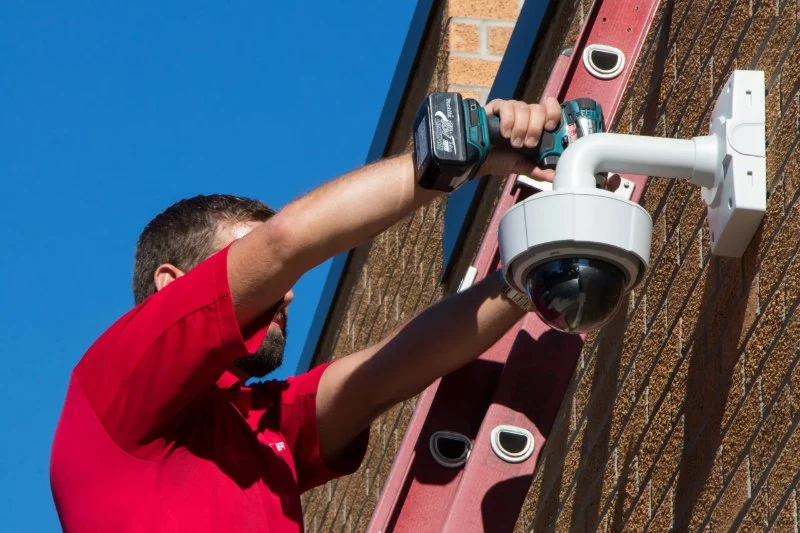
As cybercriminals and burglars become more tech-savvy, security systems must evolve to keep up with these threats. Updating your security software, cameras, or alarms ensures that you are protected against the latest hacking techniques and criminal tactics. For example, newer software versions often include patches for security vulnerabilities that older systems might have, keeping your system resilient against breaches.
2.2. Improved System Performance
Updating your security system ensures that all components work together seamlessly. Regular updates can improve the efficiency and functionality of the system, such as enhancing camera quality, reducing lag, and increasing the system’s overall responsiveness. For instance, a firmware update can provide faster alerts and more accurate motion detection.
2.3. Better Compatibility with New Devices
As you add new smart devices to your home or office, it’s important that your security system remains compatible with them. Regular updates ensure your system can integrate with the latest smart locks, cameras, and other devices, allowing you to expand your security setup and take advantage of new features like remote access and automated alerts.
3. Risks of Not Updating Your Security Systems
Neglecting to update your security system can lead to serious consequences. Here are some of the risks associated with outdated security systems:
3.1. Vulnerability to Cyberattacks
Many modern security systems, particularly those that are connected to the internet, rely on software updates to fix known vulnerabilities. Failing to keep your system updated opens it up to potential cyberattacks, such as hacking or unauthorized access to your surveillance feeds. Cybercriminals are constantly looking for weak points in security systems to exploit, so keeping your software current is vital for protecting your data and privacy.
3.2. Increased Likelihood of System Failures
Over time, technology can degrade or encounter issues that affect its performance. If your security system isn’t regularly updated, it may start to malfunction, leading to delayed alerts or even complete failures when you need it most. A broken alarm system or a malfunctioning camera could mean the difference between detecting a break-in and allowing it to happen undetected.
3.3. Legal and Insurance Implications
In some cases, failure to maintain up-to-date security systems could have legal or insurance-related consequences. For example, if a break-in occurs and it’s found that your system was outdated or not functioning properly, it could affect your insurance claim or liability. Regular updates help demonstrate that you’re taking the necessary steps to ensure your property’s protection.
4. How Often Should You Update Your Security Systems?
How frequently you should update your security systems depends on the type of system you have and the technology it uses. Below are general guidelines for maintaining your system:
4.1. Update Software Regularly
If your system includes smart features or software, ensure that you’re updating it at least every 3 to 6 months. Software updates often include patches for vulnerabilities, bug fixes, and new features. Set up automatic updates if possible, or check for them regularly to ensure your system is always current.
4.2. Hardware Upgrades Every Few Years
While software updates are frequent, hardware upgrades are typically less frequent but still important. Consider upgrading your cameras, alarms, or locks every 3 to 5 years, especially if you notice that your current hardware is becoming outdated or inefficient. Newer models will often have improved technology, such as higher resolution video or more advanced sensors.
4.3. Monitor Your System’s Performance
If you notice that your security system isn’t performing as it should (such as delayed alerts or blurry video footage), it’s time for an update or upgrade. Regularly monitor your system and make updates based on its performance rather than just following a set schedule.
5. When to Consult a Professional for Security System Updates
While some updates can be done on your own, there are times when you’ll need to consult a professional. Here are some situations where it’s best to call in an expert:
5.1. Complex System Updates
If your security system includes complex hardware or software that requires professional installation or updates, it’s best to call a licensed locksmith or security expert. These professionals can ensure that updates are done correctly without compromising the integrity of your system.
5.2. System Malfunctions
If your system is experiencing performance issues that can’t be fixed by simple updates, it may need a thorough inspection or repair. A professional can assess your system, identify underlying problems, and perform necessary repairs or replacements.
5.3. Security Upgrades
When it’s time to upgrade your system to incorporate new features, such as smart home integration or enhanced surveillance technology, a professional can help you make the right choices and ensure seamless installation and setup.
For more advice on maintaining and updating your security systems, or to find reliable professionals in your area, visit [Locksmith Finder]. We offer expert recommendations to help you keep your property safe and secure.


 Minute Key3.0 (12 reviews)
 KeyMe Locksmiths4.0 (8 reviews)
 Minute Key4.0 (4 reviews)
 Affordable Locksmith4.0 (83 reviews)
 J&R Lock Service0.0 (0 reviews)
 KeyMe Locksmiths4.0 (3 reviews)
 How to Choose the Right Locksmith for Your Lock Installation Services
 How to Protect Your Business During After-Hours Operations
 How to Protect Your Home During Nighttime With Advanced Locks
 Importance of Installing a Smart Lock on Your Garage Door
 How to Choose the Right Locksmith for Your Lock Repair Needs
 Smart Lock Installation: What Every Homeowner Needs to Know