
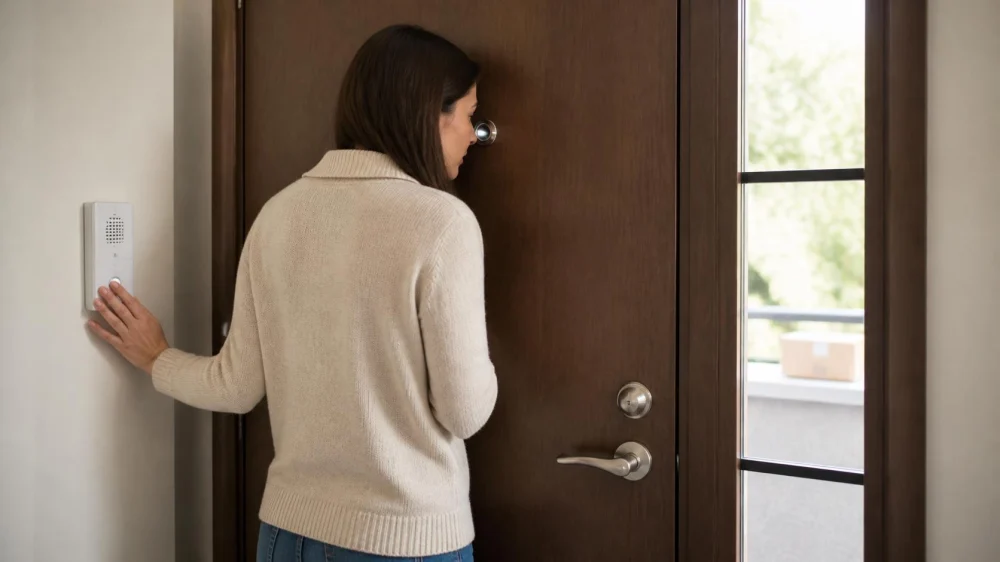
Door Viewer and Intercom Check: Confirm Visitors First
On this page
Quick answer
Keep the door closed and locked while identifying an unexpected visitor. Use the viewer, intercom, or camera; ask for name, organization, and purpose; then verify through a known phone number, app, building desk, or scheduled appointment. Do not share occupancy, access codes, routines, or whether someone is alone. If the device is blocked, loose, recording incorrectly, or cannot support the resident’s needs, arrange authorized service.
This guide supports routine residential entry security in the United States. Building rules, tenancy, consent, recording laws, accessibility, fire egress, and equipment differ. It does not replace emergency services or authorize surveillance.
Build a verification routine
Visitor verification confirms identity and purpose through an independent channel before a resident releases the door or building entrance. Seeing a uniform, badge, vehicle, or delivery bag is not independent confirmation.
- Pause. Keep the door closed and do not announce sensitive household details.
- Observe. Use the available viewer or camera without approaching an unsafe area.
- Ask. Request the visitor’s name, organization, reason, and who arranged the visit.
- Verify independently. Call a known public number or check the resident’s own booking account, not a number supplied only by the visitor.
- Choose the next step. Decline, reschedule, direct the visitor to building staff, or permit entry under the household plan.
- Escalate danger. Contact building security or emergency services for threats, forced entry, fire, medical danger, or immediate risk.
Check the door viewer
From inside with the door closed, confirm the viewer is secure, unobstructed, and provides the expected field of view. Look for looseness, scratches, clouding, paint, tape, moisture, or a changed image. Do not dismantle shared or fire-rated door hardware without permission.
Test in daytime and at night with normal corridor lighting. A viewer that works only when the resident stands on tiptoe or cannot be used from a mobility device is not an effective solution for that person.
Cover the interior side if the product includes an approved privacy shutter. If the viewer seems reversed, tampered with, or unexpectedly transparent from outside, stop relying on it and ask property management or an authorized locksmith to inspect it.
Quick Key Locksmith & Security Wheaton
600 S County Farm Rd Unit 120, Wheaton, IL 60187, USA
Check the intercom or camera
Test audio in both directions, volume, call notification, door-release behavior, app access, and the correct unit association. Verify that the resident can end the conversation without unlocking.
For video devices, check the useful viewing area, night performance, current account owners, shared users, storage settings, and notification access. Avoid aiming into private neighboring areas beyond what is necessary for entry management.
Never speak an entry code aloud to an unknown visitor or display codes in camera view. Remove former residents, staff, vendors, and guests from digital access when authorized, and protect account recovery methods.
Handle deliveries and service visits
- Package delivery: verify the expected order in the resident’s own account and use a designated drop location when available.
- Utility or repair worker: confirm the appointment with the utility, landlord, manager, or contractor through a known contact.
- Home care or health visit: use the agency’s arrival process and call the office when the person or time is unexpected.
- Sales or fundraising: decline through the closed door if the resident does not wish to engage.
- Emergency claim: call the relevant emergency or utility service independently rather than opening solely because the visitor says the situation is urgent.
Do not photograph identification documents or retain personal data without a lawful, necessary, and approved reason.
Plan accessible alternatives
Ask each resident which method they can reliably see, hear, reach, understand, and operate. Alternatives may include a lower viewer, approved wide-angle viewer, visual or vibrating alert, louder chime, accessible intercom control, trusted building desk, or authorized support person.
Keep the plan simple under stress. Post only non-sensitive instructions such as a building desk number in a private interior location; do not expose access codes or household vulnerabilities.
Any device installation on a rental, shared, historic, or fire-rated door may require permission and approved hardware. Confirm before drilling or altering the door.
Visitor-check checklist
- Door remains closed and normal egress works
- Viewer secure, clear, private, and usable by the resident
- Intercom audio, call, and release functions tested separately
- Camera account owners and authorized users current
- Independent verification contacts saved
- No access codes or occupancy details shared at the door
- Deliveries and service appointments checked in resident accounts
- Accessible backup method available
- Property manager, locksmith, and emergency boundaries defined
Limitations and safety notes
- A viewer or camera can have blind spots and does not prove identity.
- Do not open the door to confront a suspicious or threatening person.
- Do not alter locks, fire doors, wiring, or shared systems without authority.
- Recording and audio rules vary; obtain current local and property guidance.
- Call emergency services for attempted forced entry, threats, fire, medical danger, or immediate risk.
Frequently asked questions
Is a uniform enough to verify a worker?
No. Confirm the appointment and identity through the organization’s known number, building management, or the resident’s own service account.
Should I tell a visitor that I am home alone?
No. Keep occupancy and routine details private. You can decline or say the visit cannot be accepted without explaining who is home.
Can I install a video doorbell in a rental?
Check the lease, property rules, mounting restrictions, shared-area privacy, recording law, network needs, and removal requirements before installation.
What if I cannot use the existing viewer?
Ask the property owner or an authorized locksmith about approved accessible hardware or an alternative verification method.
Who repairs an intercom?
Building management or the system vendor often controls shared intercoms. A locksmith may service some access-control components when authorized.
Sources and evidence notes
This article reflects general access-control and personal-safety principles: keep the barrier closed, verify through an independent trusted channel, limit sensitive information, preserve authorized egress, maintain current users, plan accessible alternatives, and use authorized professionals for door or shared-system changes.
Next steps
Test the viewer and intercom with a trusted person during daylight and at night. Confirm the resident can observe, speak, decline, and end the interaction without unlocking. Save known verification contacts, remove obsolete digital users, and report any loose, blocked, inaccessible, or malfunctioning equipment for authorized service.
 Minute Key5.0 (1 reviews)
 Minute Key0.0 (0 reviews)
 Buckeye 24 hr Locksmith4.0 (149 reviews)
 KeyMe Locksmiths4.0 (30 reviews)
 Minute Key3.0 (21 reviews)
 KeyMe Locksmiths3.0 (16 reviews)
 How to Protect Your Car From Lock Manipulation Techniques
 How to Choose Between a Local Locksmith and a National Service
 Locksmith Advice: How to Maintain Locks to Prevent Wear and Tear
 Smart Lock Installation: What Every Homeowner Needs to Know
 What Is Included in Emergency Locksmith Services for Homes and Cars
 Smart Lock Battery Backup: Plan Before Power Runs Out