
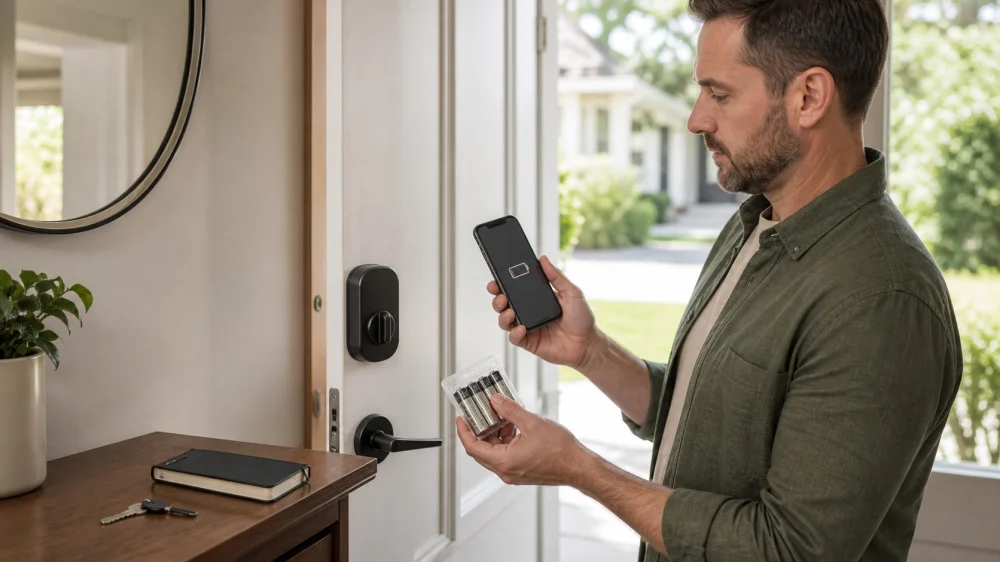
Smart Lock Battery Warning: Build a Backup Access Plan
On this page
Quick answer
Do not wait for a smart lock to stop responding. While an authorized person can still enter, find the exact model instructions, obtain the specified fresh batteries, keep the door open during replacement, and preserve a working mechanical key or manufacturer-approved emergency method. After replacement, test locking and unlocking from both sides, verify every authorized user, remove obsolete access, and record the date.
This guide is for owners and authorized users of residential smart locks in the United States. Products differ, and building, rental, fire-egress, accessibility, insurance, and property-management requirements may apply. It does not describe lock bypass.

What the warning means
A smart-lock low-battery warning indicates that the electronic lock estimates its remaining power is approaching a level where reliable operation may be reduced. The warning threshold and remaining time vary by model, battery type, temperature, wireless activity, motor load, and door alignment.
A slow motor, repeated retries, delayed response, dim keypad, intermittent connection, or frequent warnings may involve more than battery age. Binding hardware or a misaligned door can make the motor work harder. Do not assume new batteries will correct a mechanical problem.
App notifications can fail because of permissions, connectivity, account changes, or a disconnected hub. Use the lock’s physical indicator and regular inspection in addition to remote alerts.

Prepare before changing batteries
- Confirm authorization. Work only on a lock you own or are expressly permitted to maintain.
- Identify the model. Use the interior label, purchase record, or app account without exposing serial numbers or codes publicly.
- Read the instructions. Confirm battery chemistry, size, quantity, polarity, replacement sequence, and reset warnings.
- Keep the door open. Prevent an accidental lockout while the battery cover is removed.
- Gather backups. Have the mechanical key or approved emergency method and an authorized second person available when appropriate.
- Check the door. Manually observe whether the latch or bolt moves freely with the door open and closes without force.
Do not mix old and new batteries, different chemistries, or brands when the manufacturer advises against it. Do not use a rechargeable type unless the product explicitly supports it.
Replace batteries correctly
Work from the secure interior side and follow the documented cover-removal method. Remove the complete battery set, inspect for corrosion or leakage without touching residue, and install the approved fresh set in the correct orientation.
If a battery has leaked, isolate the area, keep children and pets away, and follow battery manufacturer and local disposal guidance. Do not scrape, neutralize, or clean unknown residue with an improvised chemical.
Reinstall the cover without pinching wires or overtightening fasteners. Perform any required wake, calibration, or handing process exactly as the lock instructions specify. A factory reset can erase users or settings and should not be used casually.
Verify authorized backup access
Many smart locks include a mechanical cylinder; others use a manufacturer-defined emergency power contact or a separate building access process. Identify the approved method before the battery is fully depleted.
Store backup keys securely with authorized people, not in an obvious location near the door. Record who holds them and retrieve them when access changes. For rental or managed property, follow the lease, manager, and emergency access procedure.
If a child, older adult, pet, or anyone at risk is locked inside, or if there is fire, medical danger, or another emergency, contact emergency services first. Do not spend critical time experimenting with the lock.
Test and document the lock
- Operate the bolt several times with the door open.
- Close the door and test normal locking without pushing or pulling it into alignment.
- Test the interior thumb-turn and required free-egress operation.
- Test the mechanical key or approved backup method.
- Confirm authorized codes, credentials, apps, and integrations one at a time.
- Remove former residents, workers, guests, or temporary codes when authorized.
- Check that alerts reach the intended current account.
- Record battery date, product used, test result, and next inspection reminder.
Never publish screenshots containing addresses, serial numbers, access codes, account emails, or device identifiers.
Battery-warning checklist
- Exact model and current instructions confirmed
- Approved batteries obtained as a complete fresh set
- Door kept open and backup access available
- Mechanical alignment checked separately
- No corrosion, leakage, pinched wires, or damaged cover found
- Required calibration completed without an unnecessary reset
- Interior, exterior, key, and authorized digital access tested
- Obsolete access removed through approved controls
- Replacement date and holders documented securely
Limitations and safety notes
- Do not dismantle, drill, pick, or force a lock based on generic online advice.
- Do not close the door until normal and backup operation have been verified.
- Do not perform electrical or battery cleanup beyond product safety instructions.
- Fire and life-safety egress must remain available; contact the appropriate professional if it does not.
- Use an authorized locksmith or the manufacturer when the model, ownership, corrosion, alignment, or backup method is uncertain.
Frequently asked questions
How long will a smart lock work after a low-battery alert?
There is no universal time. Replace the batteries promptly according to the exact model instructions rather than relying on an estimate.
Can I mix one new battery with older batteries?
Replace the full set as directed. Mixing ages or types can reduce predictable performance and may conflict with the manufacturer’s instructions.
Why does the new battery warning remain?
Check polarity, supported battery type, cover seating, calibration steps, app refresh, and door alignment. Contact support or an authorized locksmith if it persists.
Should I factory-reset the lock?
Not unless the documented troubleshooting process requires it and you understand which users, codes, and integrations will be erased.
What if there is no key cylinder?
Use only the manufacturer-approved emergency power or property access process. Establish it before battery depletion and keep the required item available to authorized users.
Sources and evidence notes
This article follows general electronic-lock maintenance and access-control principles: use model instructions, replace complete approved battery sets, keep the door open during service, preserve authorized backup access, test egress and every credential, protect access data, and assign lock faults to an authorized locksmith or manufacturer.
Next steps
Find the model instructions, gather the specified batteries and backup key, and replace the full set with the door open. Test the lock from both sides and confirm every authorized entry method. Record the date and schedule a reminder before the next expected replacement window, adjusting for actual performance.



 Minute Key5.0 (1 reviews)
 Minute Key0.0 (0 reviews)
 Buckeye 24 hr Locksmith4.0 (149 reviews)
 KeyMe Locksmiths4.0 (30 reviews)
 Minute Key3.0 (21 reviews)
 KeyMe Locksmiths3.0 (16 reviews)
 How to Protect Your Car From Lock Manipulation Techniques
 How to Choose Between a Local Locksmith and a National Service
 Locksmith Advice: How to Maintain Locks to Prevent Wear and Tear
 Smart Lock Installation: What Every Homeowner Needs to Know
 What Is Included in Emergency Locksmith Services for Homes and Cars
 Smart Lock Battery Backup: Plan Before Power Runs Out