
- 1-Understanding-Why-Smart-Locks-Stop-Working
- 2-First-Steps-to-Take-When-You-Are-Locked-Out
- 3-Emergency-Entry-Methods-You-Should-Know
- 4-How-Different-Smart-Lock-Models-Handle-Dead-Batteries
- 5-Real-Life-Lockout-Stories-and-Lessons-Learned
- 6-Preventing-Future-Smart-Lock-Battery-Failures
- 7-When-to-Call-a-Professional-Locksmith
- 8-Smart-Lock-Maintenance-Best-Practices
1. Understanding Why Smart Locks Stop Working
Smart locks have transformed home security across the United States. From keyless entry and smartphone control to temporary guest access and integration with smart home systems, these devices offer a level of convenience that traditional locks cannot match. However, despite their advanced technology, one common problem continues to surprise homeowners: a dead battery.
Many people assume a smart lock will provide obvious warnings long before the battery runs out. While most modern models do provide low-battery alerts, these notifications are often overlooked. Busy schedules, ignored app notifications, or disconnected Wi-Fi networks can cause homeowners to miss critical warnings.
When the battery dies completely, the lock may lose the ability to communicate with your phone, recognize keypad codes, or operate the motor that unlocks the door. Suddenly, a feature designed for convenience becomes an obstacle standing between you and your home.
Understanding how your specific smart lock operates is the first step toward avoiding panic. Most smart lock manufacturers anticipate battery failures and include backup entry methods. The challenge is that many users never learn about these features until they are standing outside their home unable to get in.

2. First Steps to Take When You Are Locked Out
The moment you realize your smart lock battery has died, it is important to remain calm. Many lockouts are resolved within minutes because the lock includes a backup solution.
Before attempting any troubleshooting, take a close look at your lock model. Some smart locks have hidden battery terminals, emergency power contacts, or mechanical key overrides that are not immediately obvious.
Start by checking whether another entry point is available. Many homeowners have secondary doors, garage entrances, or smart locks on alternative entryways. If another family member has access, contacting them may save significant time and stress.
Next, open the lock's companion mobile application if available. Some locks may still communicate through alternative power sources or display useful diagnostic information. Even if the lock appears unresponsive, the app may indicate whether the issue is battery-related or caused by connectivity problems.
Avoid forcing the lock or attempting aggressive entry methods. Damaging the lock mechanism can turn a simple battery issue into an expensive repair project.

3. Emergency Entry Methods You Should Know
One of the biggest misconceptions about smart locks is that a dead battery automatically means you are completely locked out. In reality, manufacturers design multiple layers of redundancy into most products.
1. Mechanical Key Override
Many smart locks contain a hidden key cylinder. The keyhole may be concealed behind a decorative cover or integrated into the lock's design. Homeowners who keep their backup key in a safe location can regain access quickly.
2. External Battery Contacts
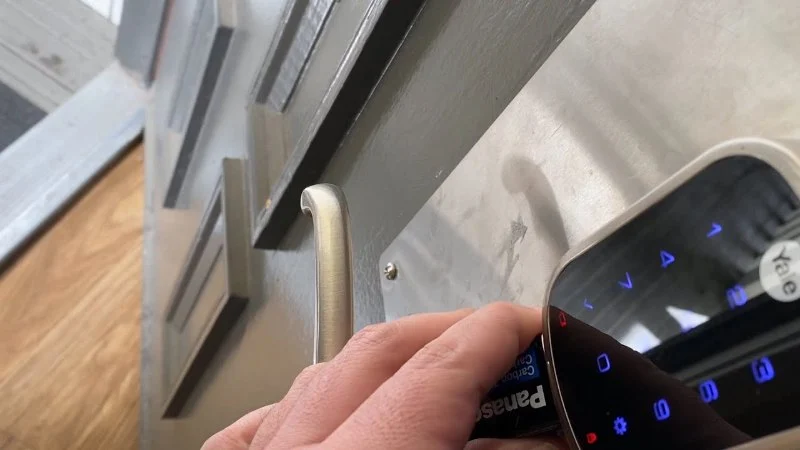
Several popular smart lock brands include emergency battery terminals on the exterior side of the lock. A standard 9-volt battery can be temporarily connected to these contacts, supplying enough power to activate the keypad and unlock the door.
This feature has saved countless homeowners from late-night lockouts. A spare battery stored in a vehicle or emergency kit can become invaluable.
3. Backup Access Codes
Some advanced locks maintain emergency access functionality even when the primary battery is critically low. Depending on the model, entering a backup code may provide a final opportunity to unlock the door before complete shutdown occurs.
4. Alternative Smart Home Access
Homeowners with integrated smart home systems may be able to access their property through connected garage doors, secondary locks, or automation hubs.
Knowing these options before an emergency occurs dramatically improves your chances of resolving the problem without professional assistance.
4. How Different Smart Lock Models Handle Dead Batteries
Not all smart locks behave the same way during power failures. Understanding your specific model's design can make a significant difference during an emergency.
Entry-level smart locks often rely on standard AA batteries and include mechanical key backups. Mid-range models may incorporate external battery contacts or Bluetooth emergency functionality.
Premium smart locks frequently provide multiple fail-safe systems, including battery monitoring, remote notifications, backup power options, and integration with broader smart home ecosystems.
A homeowner in Arizona shared an experience where extreme summer temperatures accelerated battery drain. Despite receiving warnings through the manufacturer’s app, the notifications went unnoticed. Fortunately, the lock included external power contacts, allowing quick restoration of access using a spare battery from the car.
This example highlights why familiarizing yourself with your lock's emergency procedures is just as important as learning how to use its advanced features.
5. Real-Life Lockout Stories and Lessons Learned
Smart lock battery failures occur more often than many people realize.
A family in Denver returned home after a week-long vacation only to discover their front-door smart lock was completely unresponsive. The lock had issued low-battery notifications several weeks earlier, but the messages were buried among hundreds of smartphone alerts. After locating a spare physical key stored with a trusted neighbor, they regained access without damaging the lock.
In another case, a remote worker in Seattle experienced a lockout during a heavy rainstorm. Assuming the smart lock was malfunctioning, he attempted multiple resets before discovering that the batteries had simply reached the end of their lifespan. An emergency battery terminal allowed access within minutes once the correct procedure was followed.
Stories like these demonstrate a common theme: the problem is often not the lock itself but a lack of preparation for battery replacement.
Many homeowners invest heavily in smart home technology yet spend little time learning emergency recovery procedures. A few minutes of preparation can prevent hours of frustration.
6. Preventing Future Smart Lock Battery Failures
The best way to handle a dead smart lock battery is to prevent the situation from occurring in the first place.
1. Create a Battery Replacement Schedule
Rather than waiting for low-battery alerts, establish a regular replacement schedule. Many homeowners replace batteries every six to twelve months depending on usage levels.
2. Use High-Quality Batteries
Premium alkaline or lithium batteries generally provide more reliable performance than inexpensive alternatives. Quality batteries also tend to perform better in extreme temperatures.
3. Monitor Smart Lock Notifications
Enable all battery-related alerts within your smart lock application. Verify that notification permissions remain active after phone updates or software changes.
4. Keep Backup Entry Tools Available
Store spare keys, emergency batteries, and access instructions in secure but accessible locations.
These simple preventive measures dramatically reduce the likelihood of an unexpected lockout.
7. When to Call a Professional Locksmith
While many battery-related lockouts can be resolved independently, certain situations require professional assistance.
If the lock has suffered physical damage, experienced water intrusion, electronic failure, or software malfunction, attempting self-repair may worsen the problem.
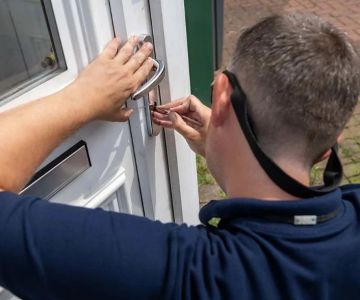
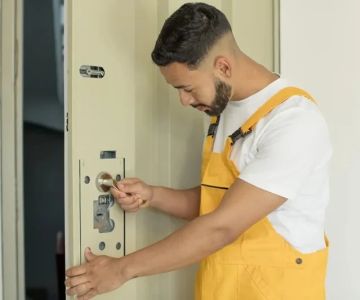
A qualified locksmith can safely diagnose the issue, restore access, and minimize damage to the lock and door hardware. Professional assistance is particularly valuable when dealing with high-security smart locks that incorporate advanced anti-tampering features.
For homeowners seeking reliable assistance, Locksmith Finder can help connect users with experienced locksmith professionals, emergency lockout services, replacement hardware options, and smart lock specialists capable of handling a wide range of residential security situations.
Having access to professional support becomes especially important during late-night lockouts, severe weather conditions, or situations involving children, elderly family members, or urgent medical needs.
8. Smart Lock Maintenance Best Practices
Smart locks are sophisticated devices that benefit from routine maintenance. Battery management is only one aspect of long-term reliability.
Regularly inspect battery compartments for corrosion or moisture. Check mounting screws to ensure the lock remains properly aligned. Misalignment can increase motor strain and accelerate battery consumption.
Firmware updates should also be installed when available. Manufacturers often release updates that improve battery efficiency, security features, and overall performance.
Environmental conditions deserve attention as well. Homes in regions with extreme heat, cold, humidity, or coastal salt exposure may experience faster battery degradation and increased wear on electronic components.
Finally, perform periodic emergency-access drills. Test backup keys, review battery replacement procedures, and ensure family members understand how to operate emergency power features. Treating smart lock maintenance like any other home safety routine can prevent unexpected emergencies.
Smart locks deliver exceptional convenience, but their reliability depends on preparation and maintenance. By understanding emergency entry options, monitoring battery health, and knowing when to seek professional assistance through resources like Locksmith Finder, homeowners can enjoy the benefits of smart security without the stress of unexpected lockouts.
 Minute Key4.0 (3 reviews)
 KeyMe Locksmiths3.0 (8 reviews)
 KeyMe Locksmiths3.0 (1 reviews)
 KeyMe Locksmiths4.0 (32 reviews)
 KeyMe Locksmiths2.0 (3 reviews)
 3 Sons Lock Service4.0 (44 reviews)
 How to Prevent Key Copying and Unauthorized Access: Key Security Tips
 Mobile Locksmith Near Me in Saint Paul MN for Lockout Services — Fast & Reliable Help
 How to Protect Your Home from Forced Entry During Nighttime
 How to Protect Your Business With Restricted Access Lock Systems - Expert Tips
 Locksmith Tips for Handling Lockouts During Holidays
 How to Protect Your Car From Lock Tampering Techniques