
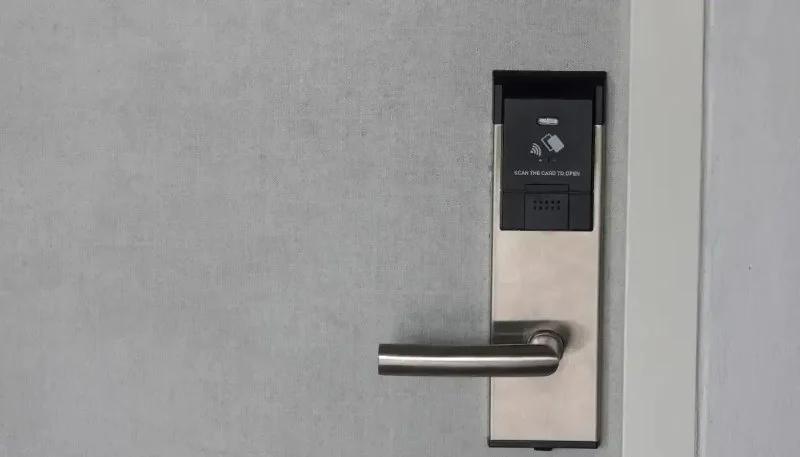
Understanding Smart Locks and Their Importance
Smart locks are a modern solution to traditional locking mechanisms. They offer convenience, enhanced security, and integration with smart home systems. Unlike conventional locks, smart locks use technologies such as Bluetooth, Wi-Fi, and Z-Wave to enable keyless entry and remote control. This makes them an attractive option for homeowners looking to upgrade their security systems.
However, like all technology, smart locks require proper maintenance to ensure they continue to function efficiently. Proper care not only extends the life of the lock but also ensures that your home remains secure. In this article, we’ll explore locksmith advice on how to maintain smart locks and prevent common issues.

Why Maintenance is Crucial for Smart Locks
Smart locks are an integral part of your home’s security, but their functionality depends on a few key factors, including battery life, software updates, and physical condition. Without proper maintenance, your smart lock could experience performance issues that impact its security features, such as unauthorized access or system failures.
Here’s why regular maintenance is essential:
- Battery Lifespan: Smart locks rely on batteries to function. A dead battery can render your lock useless, so regular battery checks are necessary to avoid unexpected failures.
- Software Updates: Just like your smartphone, smart locks require software updates to fix bugs, improve security features, and add new functionalities. Keeping your lock’s firmware up to date is crucial for its performance and security.
- Prevention of Wear and Tear: Over time, the mechanical parts of your smart lock can wear down, causing issues with the lock’s operation. Regular cleaning and lubrication can prevent these issues.
Common Issues with Smart Locks
While smart locks are generally reliable, they are not without their issues. Below are some common problems you might encounter with smart locks:
- Battery Drain: One of the most common issues with smart locks is battery drain. If your lock's battery isn’t replaced regularly, the lock may stop working, leaving your home vulnerable.
- Connectivity Issues: Smart locks rely on Wi-Fi or Bluetooth to communicate with your smartphone or smart home system. If there are connection issues, the lock may not respond to commands or allow access remotely.
- Mechanical Failure: The physical mechanism of the lock can wear out over time, especially if the lock is exposed to harsh weather conditions. This can cause the lock to jam or become difficult to operate.
- App Problems: Sometimes, the issue may not be with the lock itself but with the accompanying app. Software glitches, outdated apps, or syncing issues can prevent you from controlling your lock remotely.
Top Tips for Maintaining Your Smart Locks
Proper maintenance can ensure your smart lock continues to operate smoothly and securely. Here are some expert tips for keeping your lock in top shape:
- Regularly Replace Batteries: Most smart locks use batteries that last for several months, but this can vary depending on the lock's usage. Check the battery levels regularly and replace them as needed, especially before major holidays or long vacations.
- Perform Firmware Updates: Always keep your smart lock’s software up to date. Check for firmware updates regularly and follow the manufacturer's instructions for installation.
- Clean and Lubricate the Lock: Dust and debris can accumulate in the locking mechanism, leading to wear and tear. Clean your lock periodically with a soft cloth, and apply lubricant to the moving parts to keep them operating smoothly.
- Check for Connectivity: Test your lock’s connectivity regularly. Ensure it is working properly with your smart home system, and troubleshoot any connectivity issues with the app or your Wi-Fi network.
- Test Your Lock: Regularly test the functionality of your smart lock by locking and unlocking it both manually and remotely. This will help you catch potential issues early.
When to Call a Locksmith for Smart Lock Problems
While most smart lock issues can be solved with simple maintenance, there are times when it’s best to call a professional locksmith. Here are some scenarios where you may need to reach out for expert help:
- Battery Replacement Problems: If your smart lock has a hard-to-replace battery or if it’s malfunctioning despite new batteries, a locksmith can help you with a proper battery replacement.
- Mechanical Failure: If your lock is physically damaged or difficult to operate, a locksmith can inspect the mechanism and repair or replace it.
- Connectivity or App Issues: If you’re experiencing persistent connectivity issues or problems with the smart lock app, a locksmith may be able to diagnose and fix the problem.
- Security Concerns: If you believe your smart lock has been compromised or hacked, contact a locksmith immediately to ensure your home’s security is not at risk.
Remember, smart locks are sophisticated devices, and while they offer convenience and security, they require proper maintenance. Regular checks and timely repairs can ensure that your smart lock continues to perform reliably, protecting your home and family.
If you're looking for reliable locksmith services or smart lock products, visit Locksmith Finder to find the best locksmiths and stores near you for all your smart lock needs.


 KeyMe Locksmiths4.0 (30 reviews)
 Minute Key3.0 (3 reviews)
 Minute Key5.0 (1 reviews)
 KeyMe Locksmiths4.0 (84 reviews)
 The Flying Locksmiths Chicago Suburbs4.0 (47 reviews)
 KeyMe Locksmiths4.0 (17 reviews)
 How To Choose the Right Locksmith for Your Home Security Needs
 How to Protect Your Office During Off-Hours with Effective Locks and Alarms
 Locksmith Advice for Maintaining Smart Locks Properly
 How to Protect Your Home During Nighttime With Advanced Locks
 How to Secure Sliding Doors, Windows, and Garages with Professional Locks
 How to Protect Your Home From Lock Drilling Techniques | Locksmith Finder